
Two-Minute Iolanthe
The other day I came across Connie Kleinjans’ page of “two-minute versions” of G&S shows. She’s got two versions of Gondoliers and one each of Iolanthe and Ruddigore. The technique is the same as in blackout poetry: take the whole work and black out all but the most important and/or funniest bits.
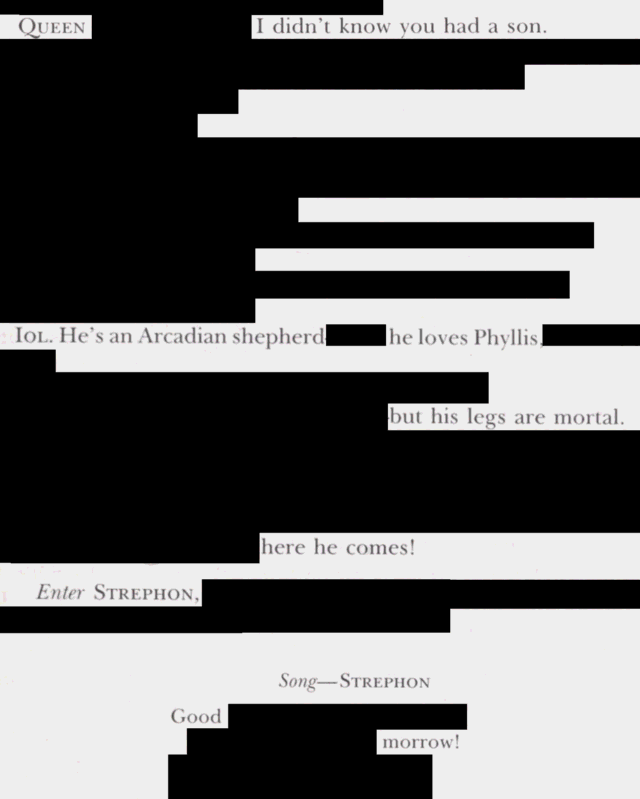
Kleinjans’ short scripts are funny in their own rights, but I wanted audio versions; so I made one. Presenting “Two-Minute Iolanthe in five minutes”.
The original recording I “blacked out” for this video is a TV broadcast of a 1976 production at the Sydney Opera House featuring Rosemary Gunn (Iolanthe), Heather Begg (Fairy Queen), Dennis Olsen (the Lord Chancellor), June Bronhill (Phyllis), Lyndon Terracini (Strephon), Graeme Ewer (Mountararat), Ronald Maconaghie (Tolloller), and Alan Light (Private Willis). This is a low-quality VHS rip of an excellent performance.
The VHS rip on YouTube is missing a chunk of the finale, which prompted some alterations to the script; I made a few other alterations for pacing. Even after those cuts, this “two-minute” Iolanthe is almost five minutes long; watch at 2.3x speed for a true two-minute experience.
To create the video, I used ffmpeg to clip and concat the snippets. When concatenating 169 tiny snippets,
your biggest problem will be “timestamp drift” between the audio and video channels. I spent a long
time cajoling ChatGPT into giving me new permutations of command-line switches to try before finally
settling on the programs linked below.
Step 1 was to get the original video (2.4 gigabytes, saved as input.mkv):
brew install ffmpeg yt-dlp
yt-dlp 'https://www.youtube.com/watch?v=DLYSZN2IqeU'
Step 2 was to snip the constituent bits via ffmpeg commands. I factored out the common arguments
into environment variables so I didn’t have to keep typing or tabbing over them.
PREFIX="-y"
SUFFIX="-i input.mkv -c:v libx264 -preset veryfast -crf 20 -c:a aac"
ffmpeg $PREFIX -ss 00:07:07.2 -to 00:07:10.5 $SUFFIX part001.mkv
ffmpeg $PREFIX -ss 00:07:45.0 -to 00:07:48.6 $SUFFIX part002.mkv
~~~~
ffmpeg turns out to be supremely sensitive to whether you put the input
(-i input.mkv) before, or after, the -ss and -to switches. With -i input.mkv as
part of the SUFFIX, my whole script.txt runs in 61 seconds; as part of the PREFIX,
it takes 98 minutes.
To concatenate all those clips and re-encode a “preview” video, we can do this:
rm list.txt
for i in part*.mkv ; do echo "file $i" >>list.txt ; done
ffmpeg -y -f concat -safe 0 -i list.txt \
  -c:v libx264 -crf 20 -preset veryfast -c:a aac -ar 48000 output.mp4
Step 3 was to fight timestamp desynchronization. My solution here was generated entirely
by blind fumbling and incantations, with input from ChatGPT. It seems that there are
basically two ways to get ffmpeg to “supercut” a video as we’re doing here: either
clip out the clips into temporary files and then concatenate all those little files
(as we did above — this way causes a lot of drift), or do one big “filter” operation
to take just the frames you care about in a single ffmpeg invocation. That looks like
this, except with 169 clips instead of 3:
ffmpeg -y -i input.mkv -filter_complex \
 "[0:v]trim=start=427.2:end=430.5,setpts=PTS-STARTPTS[v0];
  [0:a]atrim=start=427.2:end=430.5,asetpts=PTS-STARTPTS[a0];
  [0:v]trim=start=465.0:end=468.6,setpts=PTS-STARTPTS[v1];
  [0:a]atrim=start=465.0:end=468.6,asetpts=PTS-STARTPTS[a1];
  [0:v]trim=start=616.5:end=618.7,setpts=PTS-STARTPTS[v2];
  [0:a]atrim=start=616.5:end=618.7,asetpts=PTS-STARTPTS[a2];
  [v0][a0][v1][a1][v2][a2]concat=n=3:v=1:a=1[v][a]"
  -map [v] -map [a] \
  -c:v libx264 -crf 20 -preset veryfast \
  -c:a aac -b:a 192k -ar 48000 \
  output.mp4
That’s horribly slow; it seems to have quadratic behavior as the number of clips
increases. Even worse is trying to use the non-“complex” filter options -vf and -af:
ffmpeg -y -i input.mkv \
  -vf "select=between(t,427.2,430.5)+between(t,465.0,468.6)+between(t,616.5,618.7),setpts=N/FRAME_RATE/TB" \
  -af "aselect=between(t,427.2,430.5)+between(t,465.0,468.6)+between(t,616.5,618.7),asetpts=N/SR/TB" \
  -c:v libx264 -crf 20 -preset veryfast \
  -c:a aac -b:a 192k -ar 48000 \
  output.mp4
That just makes ffmpeg run out of memory before you’ve even hit 50 clips.
So I ended up using a hybrid approach: I used -filter_complex to produce
nine intermediate concatenations of 20 clips at a time, and then used
ffmpeg -y -f concat -i list.txt -c copy output.mp4
to paste those nine files together. I’ve saved my programs for posterity:
script.txt runs as a Bash script
(in just over 1 minute on my machine) to create that “draft preview” video output;
its textual contents also serve as input to script.py,
which creates the final product (in about 9 minutes) using the two-level -filter_complex
approach. The finished output.mp4 is about 42 megabytes in size.